Stop Using Google Forms for Hiring on WhatsApp (Do This Instead)
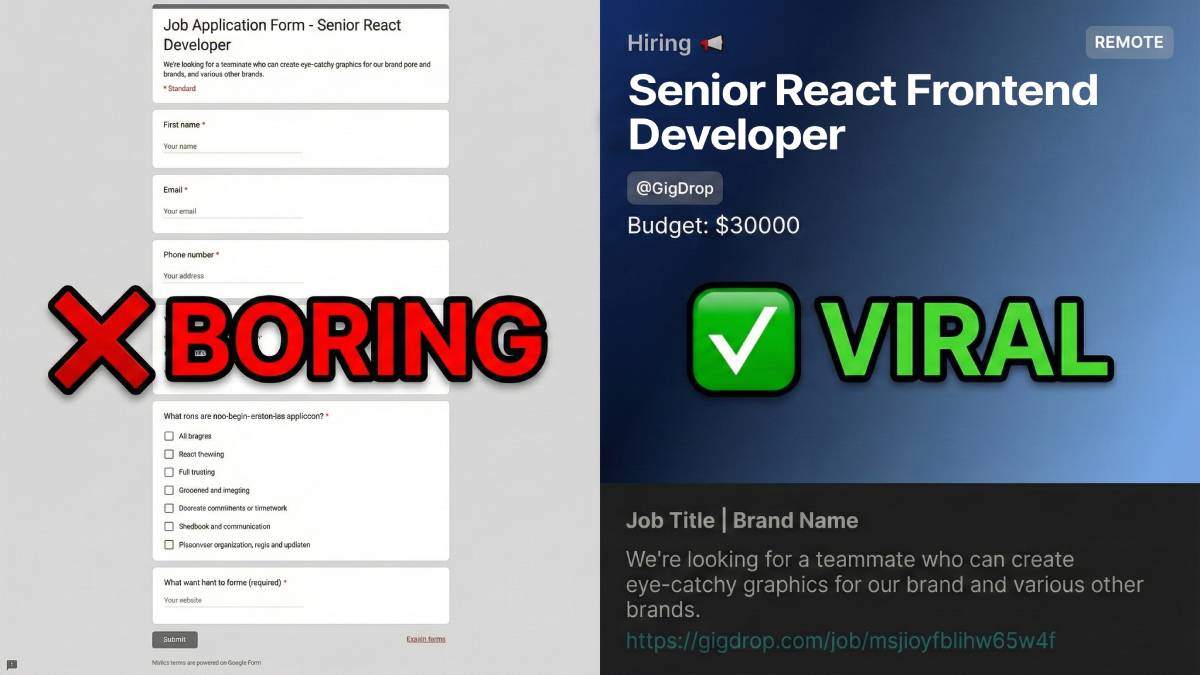
If you're still pasting a lonely Google Form link into your WhatsApp status or Instagram bio to hire for your next role, you are leaving talent on the table.
The Problem with "Just a Link"
We've all seen it. A generic link that looks like forms.gle/xyz.
- It looks suspicious: In the age of phishing, people are hesitant to click weird links.
- Zero Visual Appeal: It doesn't show your brand, the salary, or the role.
- Boring Experience: Filling out a standard form feels like a tax audit, not a career opportunity.
Enter Visual Hiring
The best candidates—the creative designers, the sharp marketers—care about presentation. They want to work for a brand that looks good.
Senior Designer
Above: A GigDrop card vs a standard text link.
Why GigDrop is the Best Google Form Alternative
Unlike a standard form builder, GigDrop is built specifically for social media recruitment.
1. Instant Visual Cards
You don't just get a link; you get an image. When you share a GigDrop link on WhatsApp, iMessage, or Slack, it unfurls into a beautiful card showing the Role, Salary, and Key Details.
2. Mobile-First Application
Our application flow is designed for thumbs, not mouses. It's quick, responsive, and feels like a modern app.
3. Manage Candidates Like a Pro
Google Sheets is great for data, but bad for workflow. GigDrop gives you a dedicated dashboard to:
- Shortlist candidates with one click.
- WhatsApp them directly without saving their number.
- Reject politely with automated templates.
Conclusion
Your hiring process is the first impression a candidate has of your company. Don't let a boring form set the tone.
Create your first Job Card now(it takes 30 seconds).